
Mostbet KYC Verification: Documents, Timeline & How to Speed It Up

This page contains affiliate links. We may earn a commission at no extra cost to you.
I got my Mostbet account verified in 16 hours. A colleague of mine waited 4 days because he uploaded a blurry photo and had to resubmit. The difference between a smooth verification and a frustrating one comes down to preparation -- having the right documents in the right format before you start.
KYC (Know Your Customer) verification is mandatory on Mostbet before you can make your first withdrawal. You cannot skip it, delay it, or work around it. Do it early. Do it right. This guide walks you through exactly what you need and how to avoid the common mistakes that cause rejections.
Verify your account now
Go to MostbetWhat Documents Do You Need?
Mostbet requires three things for full verification. Here is exactly what to prepare.
1. Government-Issued Photo ID
Accepted documents (pick ONE):
- Aadhaar Card -- Front and back. This is the fastest option for Indian users because Mostbet's system can read Aadhaar numbers automatically.
- Passport -- Photo page. Works for any nationality.
- Driver's License -- Front and back. Must be current (not expired).
- PAN Card -- Sometimes accepted as supplementary ID but usually not sufficient alone.
2. Proof of Address
Accepted documents (pick ONE):
- Utility bill -- Electricity, water, gas, or internet bill. Must be less than 3 months old.
- Bank statement -- Any major bank. Must show your name, address, and be less than 3 months old.
- Rent agreement -- Registered rent agreement with your name and current address.
- Credit card statement -- Must show name and address, less than 3 months old.
3. Selfie with ID
Hold your photo ID next to your face and take a clear photo. Requirements:
- Your face and the ID must both be clearly visible
- Good lighting -- natural light works best
- The ID text must be readable in the photo
- No filters, no glasses (unless they are on your ID photo)
- The photo must not be cropped or edited
Step-by-Step Verification Process
Go to Verification Page
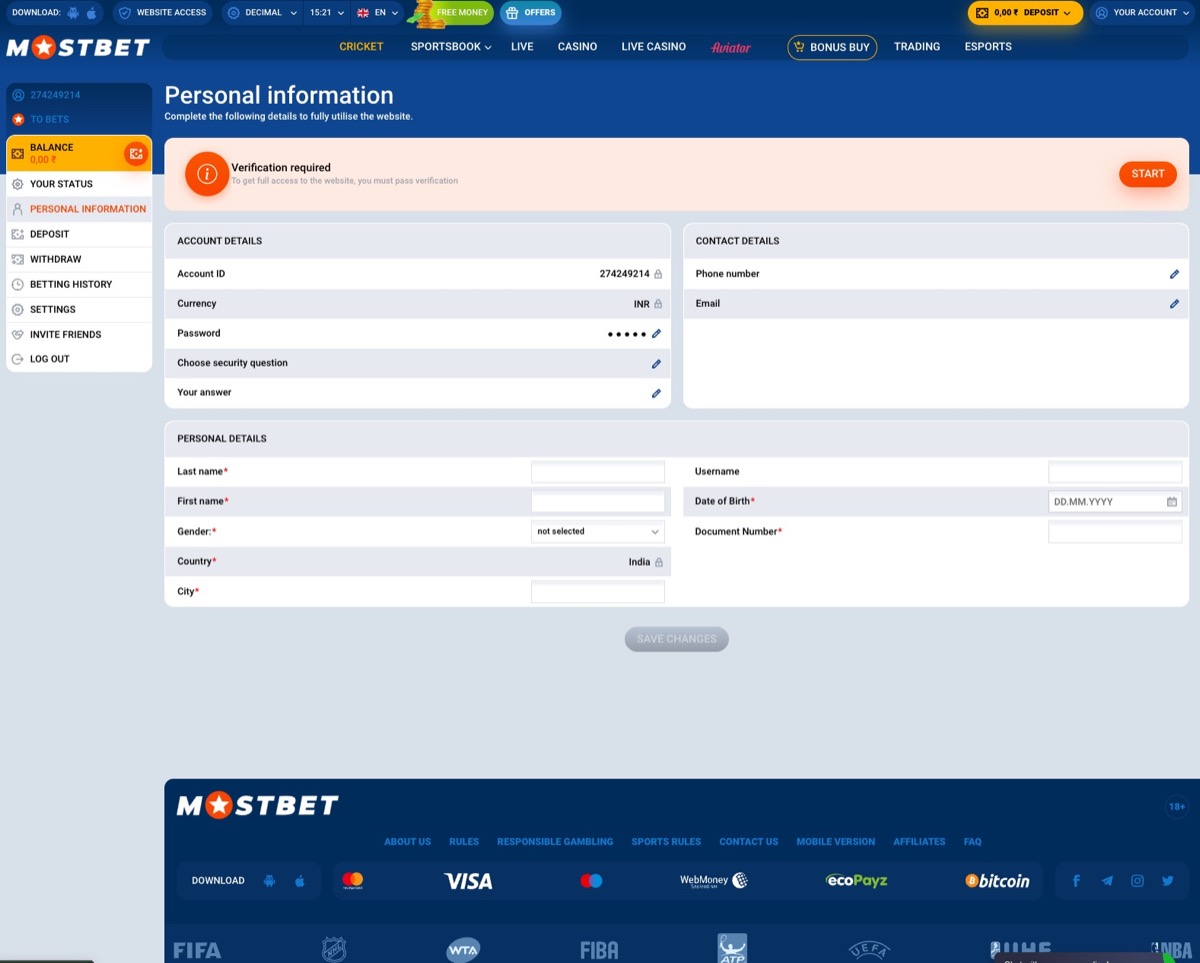
Log into Mostbet. Go to Account Settings (gear icon) and tap "Verification" or "Identity Verification." You will see three upload sections: Photo ID, Proof of Address, and Selfie.
Upload Photo ID
Tap "Upload" under Photo ID. Select your document type (Aadhaar, passport, etc.). Upload a clear photo or scan. For Aadhaar, you need to upload both front and back as separate images. Make sure the entire document is visible with no corners cut off.
Upload Proof of Address
Tap "Upload" under Proof of Address. Upload your utility bill, bank statement, or other accepted document. The document must clearly show your full name, address, and the date (must be within the last 3 months).
Take and Upload Selfie
Use your phone camera (not webcam if possible -- phone cameras are better). Hold your ID at cheek level, face the camera, and snap. Review the photo before uploading: can you read the text on the ID? Can you clearly see your face? If yes to both, upload it.
Submit and Wait
After uploading all three documents, tap "Submit for Review." You will see a status page that shows "Pending Review." Mostbet reviews documents manually (with some automated pre-screening). You will receive an email when verification is complete or if documents are rejected.
How Long Does Verification Take?
| Scenario | Typical Time | Notes |
|---|---|---|
| Aadhaar + recent utility bill | 8-18 hours | Fastest combo. Automated pre-screening helps. |
| Passport + bank statement | 18-36 hours | Standard timing. |
| Driver's license + rent agreement | 24-48 hours | Slightly longer manual review. |
| Resubmission after rejection | 24-72 hours | Goes to back of queue. Priority is lower. |
| Weekend submission | Add 12-24 hours | Reduced review staff on weekends. |
My personal verification took 16 hours: submitted Aadhaar + electricity bill on a Wednesday morning, verified by Wednesday night. The fastest I have heard from readers is 4 hours. The slowest (involving a resubmission) was 5 days.
Common Rejection Reasons and Fixes
Blurry or Unreadable Documents
The most common rejection. If the reviewer cannot read the text on your ID or proof of address, it gets rejected immediately. Fix: use your phone camera in good lighting. Place the document on a flat, contrasting surface (white document on dark table). Avoid shadows. Make sure autofocus is locked before taking the photo.
Name Mismatch
Your Mostbet account name does not match your ID. This happens when people register with a nickname, shortened name, or different transliteration. Fix: contact Mostbet support to update your account name to match your legal ID before resubmitting.
Expired Document
Expired passport, expired driver's license, or proof of address older than 3 months. Fix: use a current document. Download a recent bank statement from your bank's app -- most banks let you generate a statement instantly.
Selfie Does Not Match ID
The reviewer cannot confirm you are the same person in the selfie and the ID photo. This sometimes happens with old ID photos or significant appearance changes. Fix: ensure the selfie has similar conditions to your ID photo (similar grooming, no heavy makeup that changes your appearance).
Document Corners Cut Off
The photo does not show the entire document. Fix: make sure all four corners of the document are visible in the frame. Leave a small margin around the edges.
Tips to Speed Up Verification
- Use Aadhaar if you are in India. Automated pre-screening reads the Aadhaar number and validates it against the UIDAI database, shaving hours off the process.
- Submit on a weekday morning (before noon IST). You hit the review queue when the team starts their shift, and verification often completes the same day.
- Use high-resolution photos. 3MP minimum. Phone cameras in 2026 are all capable of this, just make sure you are not uploading screenshots of photos (which compresses resolution).
- Match names exactly. Before uploading, check that your Mostbet account name, ID name, and proof of address name are identical. Abbreviations, middle names, and transliteration differences all cause rejections.
- Use a recent bank statement as proof of address. You can download this from your bank app in 30 seconds. It is always current, clearly dated, and has your name and address. Utility bills sometimes have unclear dates or are in a family member's name.
- Do not wait until your first withdrawal. Verify your account the day you create it. By the time you need to withdraw, you will already be verified and your withdrawal will process at normal speed.
What Happens After Verification?
Once verified, your account is permanently verified (unless Mostbet's compliance team requests re-verification, which is rare and usually triggered by very large withdrawal requests). You can:
- Withdraw via any method without additional document checks
- Access higher withdrawal limits (verified accounts have higher daily and monthly caps)
- Process withdrawals faster (unverified withdrawal attempts are held until verification completes)
Verification status shows as a green checkmark on your Account Settings page. If you see a yellow "Pending" badge, your documents are still being reviewed. If you see a red "Rejected" badge, check your email for the specific rejection reason and resubmit.